
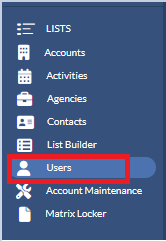
It’s not uncommon for salespeople to come and go in the media industry. A manager, or a user with manager roles (like Sales Assistants), can take advantage of the Localized User Maintenance and has the capability of activating, deactivating, editing, and merging users on the fly without the need to contact Matrix. This is all permission-based, so not everyone will have access to perform these tasks. To get the User List, click Users (Located on the left in the Navigation Panel).

Step by step instructions:
- Add a new User - When you hire a new user you will want to add them to Monarch. Click the (+) plus sign button to initiate that process by filling out the user’s Email, Display Name, Traffic ID, and finally choose an existing user to mimic for security settings and grouping.
- Filter the User List - Apply Team and Role filters to your User List.
- Search for a User - Type in the first or last name of the user that you are trying to locate.
- Toggle between Active and Inactive Users - Active users are those who are currently working for you. Inactive users are those who had worked for you in the past.
- Download the User List - When you want to have a copy of the user list offline, download the file in CSV format which can be viewed in Excel.
- Menu - Click this when you wish to edit or merge the user.
- Display Name - Clicking on a user’s name will take you to their Scorecard page.
Please click on the links below for more detailed instructions on how to add, edit, merge, or deactivate a user.
Monarch - Local User Maintenance - Add or Edit a User