
Save time by taking advantage of the Local User Maintenance within Monarch. Deactivate Users on the fly without the need to contact the Matrix Support Team.
When deactivating users, you are taking away the person’s ability to log into Monarch. Any account, account information and budget assigned to the user being deactivated will remain assigned to the user, until they are reassigned.
To Deactivate a User
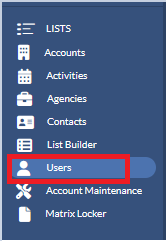
- Click Users (located on the left in the Navigation Panel).
- On the right hand side, click on the menu icon next to the user that you wish to deactivate and select Edit.

- Uncheck the “Active” checkbox.
- Update This User to be like – Select the name of a user who has already been deactivated and a part of the *Inactive Sellers Group
- Click Save.
