
When a red box appears on the top right hand side of your browser stating "An Unexpected Error has Occurred", try the performing the following steps.
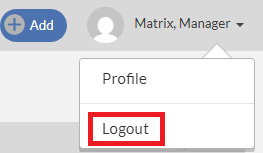
1. Log out of Matrix by clicking your name on the top right of the page and selecting Logout.
2. Close down all browsers.
3. Log into Matrix again. If the issue still persists, we suggest clearing the browser 's cache and cookies. Please click here for the instructions.
If the above steps do not resolve this issue, please contact Matrix Support by email at supportweb@matrixformedia.com, call at 877-687-9066 or chat with us by clicking the Live Chat icon located at the bottom left of the Monarch page.