
You have 3 options to activate or deactivate user.
- If you have access to the Local User Maintenance feature in Matrix, you can activate or deactivate the user on your end. Please view the articles below for the instructions:
Monarch - Local User Maintenance - Deactivate a User
Monarch - Local User Maintenance - Add or Edit a User
- If you do not have access to the Local User Maintenance feature in Matrix, please follow the steps below to activate or deactivate a new user in Matrix:
1. Go to Help & Feedback at the lower left of the screen.
2. Click Activation/Deactivation Users.
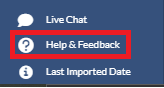
3. Fill out the Form and click Submit.
4. Upon receiving the request, Matrix Solutions will have the user activated within 1 business day.
- You can always submit the request to supportweb@matrixformedia.com.
Keyword Search: Local User Maintenance, Activate User, Deactivate User, Create User, Remove User