
The data that populates in Matrix, like the Category, Revenue Type or Outlet is what is imported from the source import file. This data likely comes from your Traffic System or your Billing System to populate in Matrix. Some of the fields can be changed after importing, like the Category and Rev Type.
To change these, please follow the steps below:
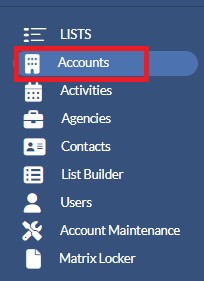
1. Click Accounts from the left navigation pane.
2. On the Accounts list page, click on the Account name that you wish to change the Category or Rev Type.
3. On the Account Profile, click on the Details tab.
4. Click on the Edit Account Details button.
5. Click in the Category and / or Rev Types field that needs to be changed.
6. Start to type in the name of the corrected Category and / or Rev Types and select the correct name once it appears in the drop down.
7. Repeat this for any other records.
8. Click the Save button in the lower right.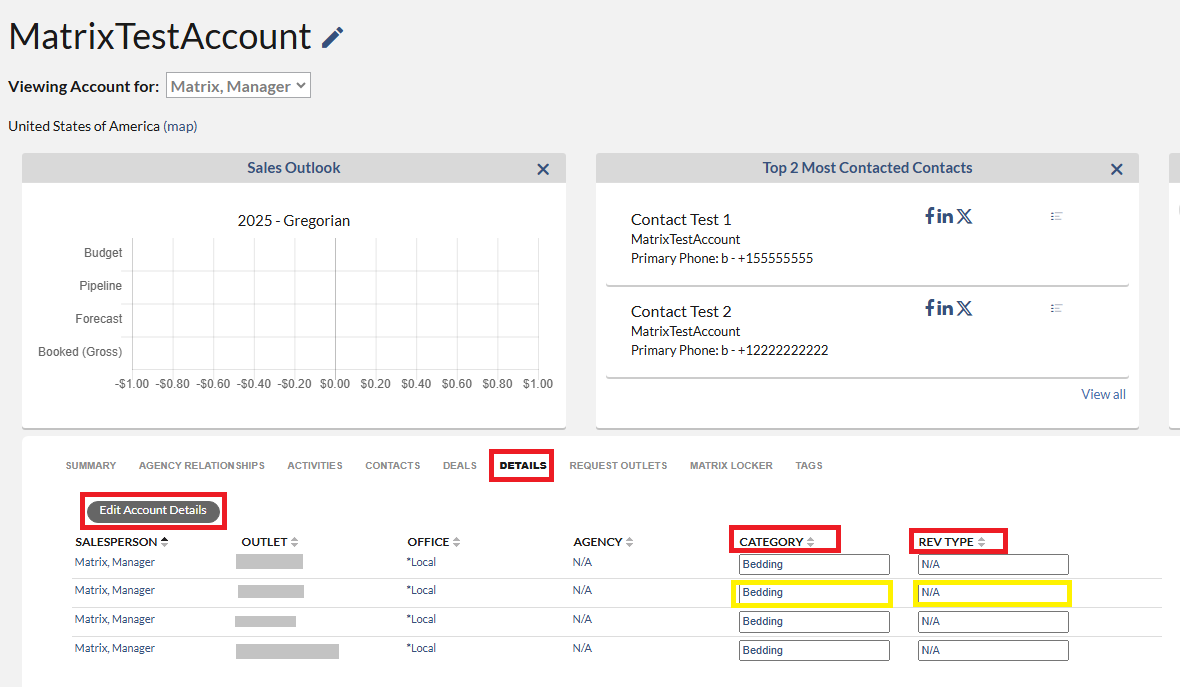
To ensure that any future records are correct, please work with your Traffic team on ensuring the coding is corrected in the source system, prior to be loaded into Matrix.
Note: For AE's - You will not be able to edit categories on Billing status accounts, only managers will be able to make those modifications on them.