Navigate to a Project as a Manager. Ensure you have Unit Codes selected on a Project just like you always have done. The change is going to come in the Participating Outlets tab.
In this screenshot we have selected 2 Unit Codes, ZZSold Stations and ABC. They are represented as the text in the parenthesis. Ex: “KRBC (ABC)” notes the Outlet is KRBC and the Unit Code is (ABC).
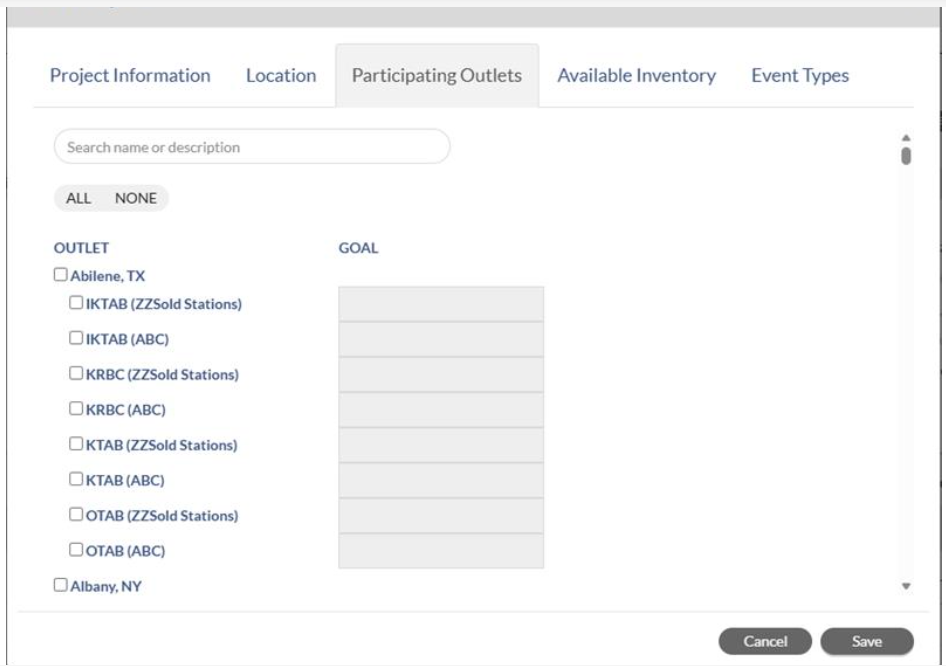
For any Projects that currently exist, as long as no changes are made to the current goals you will be able to continue to save the Project. However, if you make a change to the goals we will detect that and require you to break this value down by Unit Code. It may be advisable that any existing Projects you just leave them alone unless you’re willing to spend the time to break down each location where a dollar exists today on an Outlet (which may be minimal in many cases – but I’m noting it). When you break down the dollars into one or more rows with Unit Codes on the goals then you can save the Project and the original rows without Unit Code that previously had the goals will be removed because Unit Code goals are now required per that setting we originally enabled. These are NOT optional when creating a deal.

If in the future a customer no longer wishes to use the feature and wants to go back to Outlet only goals they can do so. When you turn this feature OFF we will sum the unit code goals up into the outlet row. This is a one way trip – if you go back to unit code goals you will have to break them out again manually. We are not storing the values for you to flip flop the setting so be sure of your plans.
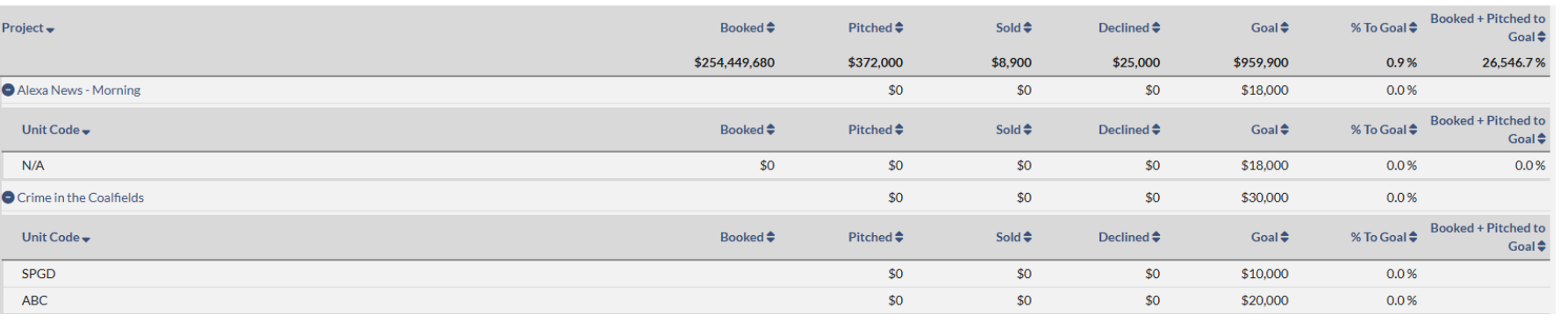
When it comes to reporting you will now see the goals on the projects, the Outlets, and the Unit Codes. Attaching an example of how they look on Unit Codes since this is where the change is. In the Alexa news project you can se the N/A Unit Code has a goal. This is because it was an existing project that did not get updated for new dollars with Unit Codes. This is what your project will look like if you choose to NOT break out the rows by unit code. Below that is the Crime in the Coalfields project which shows a couple of unit codes with Goals broken out. This is what your project will look like after you break out the goals into Unit Codes.