
This functionality is broken down into two separate areas. The Report that shows Account and Agency Maintenance (Grouping, Merging, Renaming, Ungrouping, and Unmerging) geared toward a manager as well as a Bell Notification to Notify Users on Account and Agency Maintenance geared toward salespeople.
To access this report, please follow the below instructions:
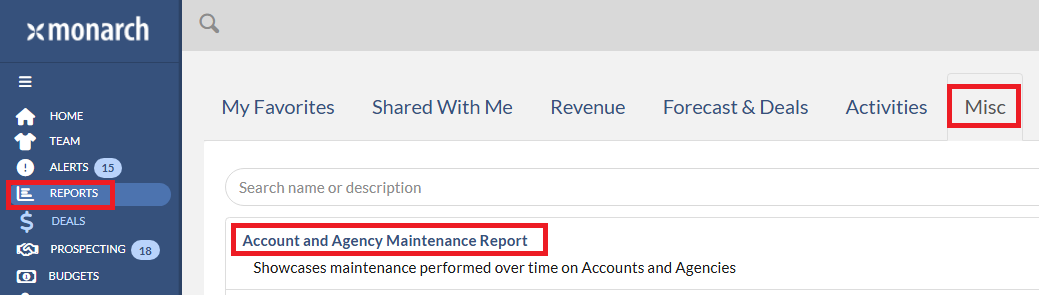
1. Navigate to Reports on the left menu bar.
2. Click Misc tab.
3. Click Account and Agency Maintenance report.
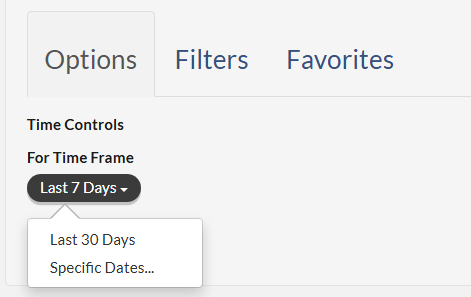
 On the report's Options, you can only change the time frame between Last 7 Days, Last 30 Days, or to specify a date range.
 There are also filters for Salespeople, Markets, Outlets, Accounts and Agencies that you may be familiar with from other reports.
 Once you are done setting up Options and Filters, please click Run to run the report.
A chart exists at the top of the page showing you the ratio of actions against each other such as Merging and Renaming (often two of the most common actions!).
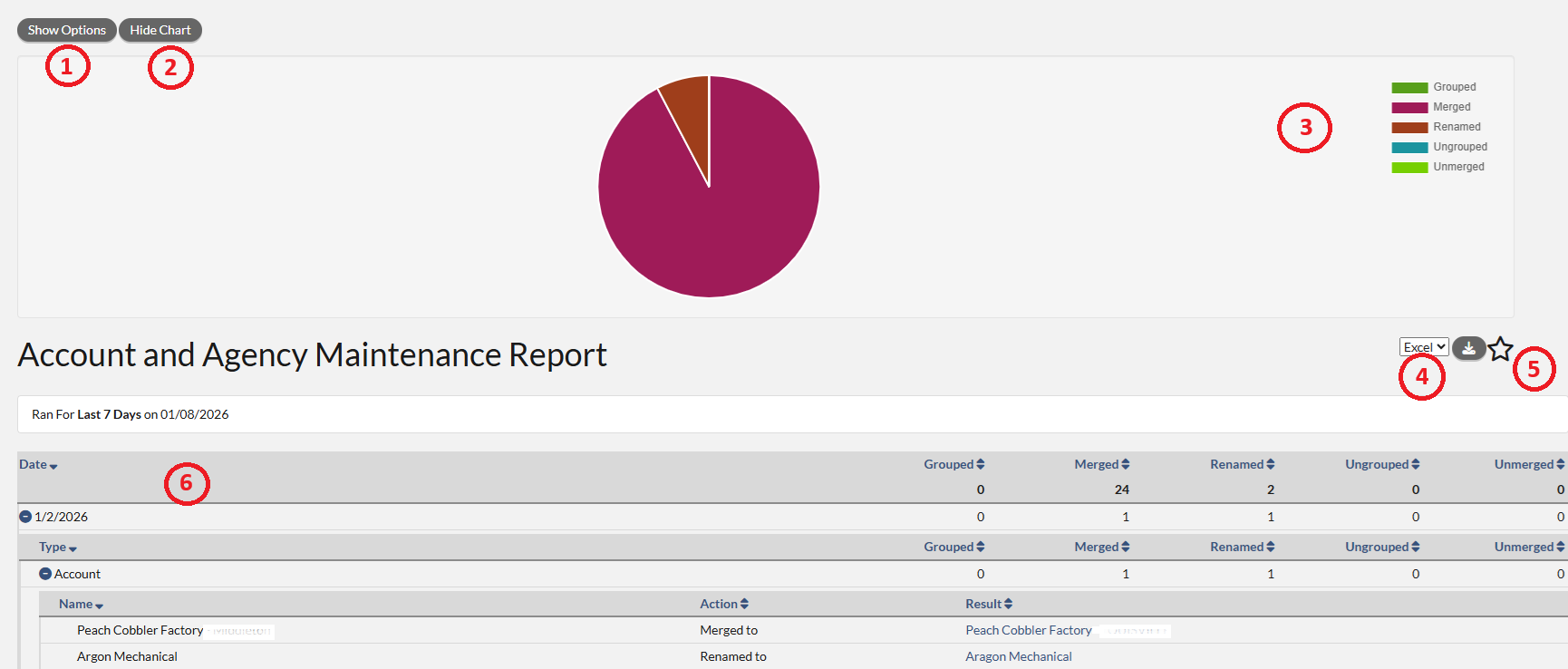 1. Show Option - clicking this button will show the Options and Filters dialog to edit the report and allow you to re-run the report.
2. Hide Chart - clicking this button will remove the chart from the view.
3. Chart Field - the report will display a line chart showing the trending over the time frame that was selected.
4. Download - in the drop-down a user can select to export the data in either a .csv format or Microsoft Excel format. Clicking the icon next to the drop down will download the report in the selected format.
5. Favorite Icon - clicking the Star icon will allow you to save the report has a favorite. Once saved as a favorite, the report can be shared to other users.
6. Report Data - the table at the bottom of the screen is the data from the report. The Projection Report is formatted so that the hierarchy is on the far left, followed by the following columns: Date, Grouped, Merged, Renamed, Ungrouped, and Unmerged.
The grid breaks down these action by day before again breaking down the action by type (Account or Agency). The end result is a quick way to see what type of maintenance occurred each day to your Accounts and Agencies and what the result was prior to and after that action was taken.
The report is designed to show you the progression of changes to Accounts and Agencies. For example, if Account1 is renamed to Account2 on July 27, and then Account 2 is merged to Account3 on July 28 then you will see each of these actions on their respective days. However, only Account3 will have an active link to an Account Profile page as that is the current name of the Account.
Finally, this report can be saved as a favorite and with that come the usual functionality of being able to add this as a data card on the home page and sharing the report with others once it has been created. Please review this article for the instruction: Monarch - How To Save a Report as a Favorite
Notification of Account & Agency Maintenance
When Accounts and Agencies that you own have a new name, the you is also notified by the bell icon in the upper right of every page. This notification will let you know how many accounts or agencies have new names due to maintenance in the last 7 days. Please review this article for more detail: Monarch - Bell Notifications - Notify User on Account & Agency Maintenance
Just a reminder that you need to own these Accounts and Agencies, or you will not see results on this alert. Often, managers own less accounts than salespeople so this notification may not be as useful to a manager as it is a seller for that reason. We encourage you to run the report instead and see changes made to Accounts and Agencies across your entire team.
Please note: There will be differences between the “Notify User on Account & Agency Maintenance” Notification and the “Account and Agency Maintenance Report”
The notification will only show Account and Agency Renames and Merges for Accounts or Agencies that you own.
-This is geared towards Account Executives.
The report will show Account and Agency Renames, Merges and Groupings for Accounts or Agencies.
-This is geared towards Managers and will show all changes based on your Team.