
Matrix Locker on Deals is a feature within Monarch CRM that allows salespeople to save and manage files specific to individual deals. While Monarch previously supported file saving at the account level (specific to Advertisers), Matrix Locker extends this capability to Deals, providing a more granular approach to document management. This feature ensures that all relevant documents are organized and easily accessible within the context of the specific Deal they pertain to.
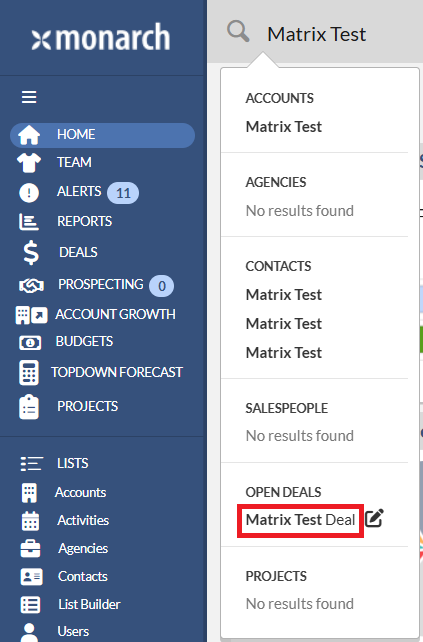
To access the Deal profile, please type in the Deal name in the global search, and then click the Deal name under the OPEN DEALS section. This will bring up the Deal profile.
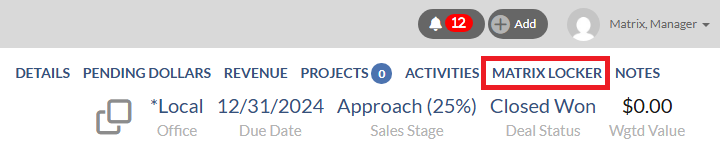
 To access the Matrix Locker section, clicking on the Matrix Locker section in the top header. This will directly take you to the Matrix Locker section.
 To upload a file, please follow the steps below:
- Hover your mouse over the top right of the Matrix Locker section.
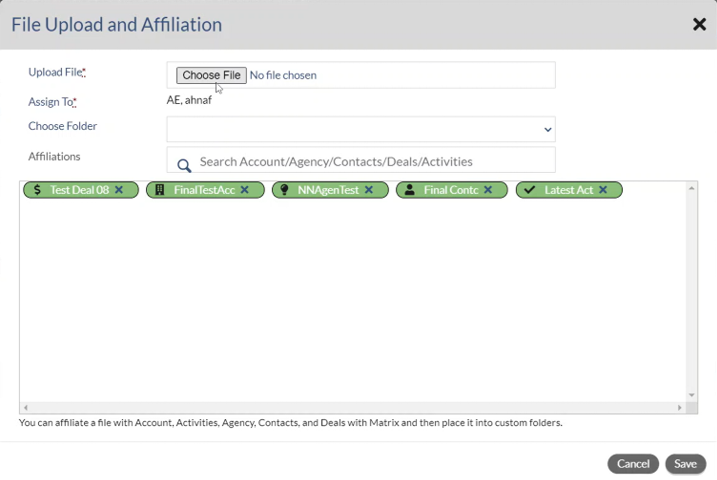
- Click the "+" button that appears. Then the File Upload and Affiliation dialog will appear.

- On the File Upload and Affiliation dialog, please click Choose File, then locate and select the file that you want to upload.
- Assign To: you can select the salesperson name to whom you wish to assign the file by typing the salesperson name and then selecting it from the pop-up list. This field is only available for managers.
- Choose Folder: you can select the folder where you would like the file to be stored.
- Affiliations: you can search for the Account, Agency, Contact, Deal or Activity that the file should be affiliated to.
- Click the Save button.
 To delete a file, click on the delete button within the Matrix Locker section to remove the file.

To download a file, click on the file name.

To sort each column, click the small arrows next to each column header.
